负责:导航栏重构
1.将类组件写法改为 hooks 写法
2.改变二级/三级菜单引入方式
之前是在当前页面一直叠加静态数据
1
2
3
4
5
6
7
8
9
10
11
12
13
14
15
16
17
18
19
| <div
className={less.item}
onClick={() => gotoProductPage('ocr-ptr')}
>
印刷识别
</div>
<div
className={less.item}
onClick={() => gotoProductPage('accurate-formula')}
>
印刷公式识别
</div>
<div
className={less.item}
onClick={() => gotoProductPage('ocr-psmhc')}
>
表格识别
</div>
|
现在通过脚本 生成导航栏 json 数据 动态加载导航栏
1
2
3
4
5
6
7
8
9
10
11
12
13
14
15
16
17
18
19
20
21
22
23
24
25
26
27
28
29
30
31
32
33
34
35
36
37
38
39
40
| // 在页面通过遍历json的方式加载
// 开放能力二/三级菜单
const getSecondList = useCallback((childKey) => {
const childData = navigatorData.ability.list.find(
(item) => item.key === childKey
);
let secondDomList = childData.children.map((item, index) => {
return (
<div className={less.secondMenuItemArea} key={`${item.key}-${index}`}>
<>
<div className={less.secondMenuTitle}>
{item.label}
<div className={less.titleContent}>
{item.children.map((itemChild, idx) => {
return (
<div
className={less.titleItem}
key={`${itemChild.key}-${idx}`}
>
<span className={less.thirdLabel}>
<b
onClick={() => gotoProductPage(itemChild.url)}
className={less.labelHover}
>
{itemChild.label}
</b>
{thirdLabelIcon(itemChild.tag)}
</span>
</div>
);
})}
</div>
</div>
</>
</div>
);
});
return secondDomList;
}, []);
|
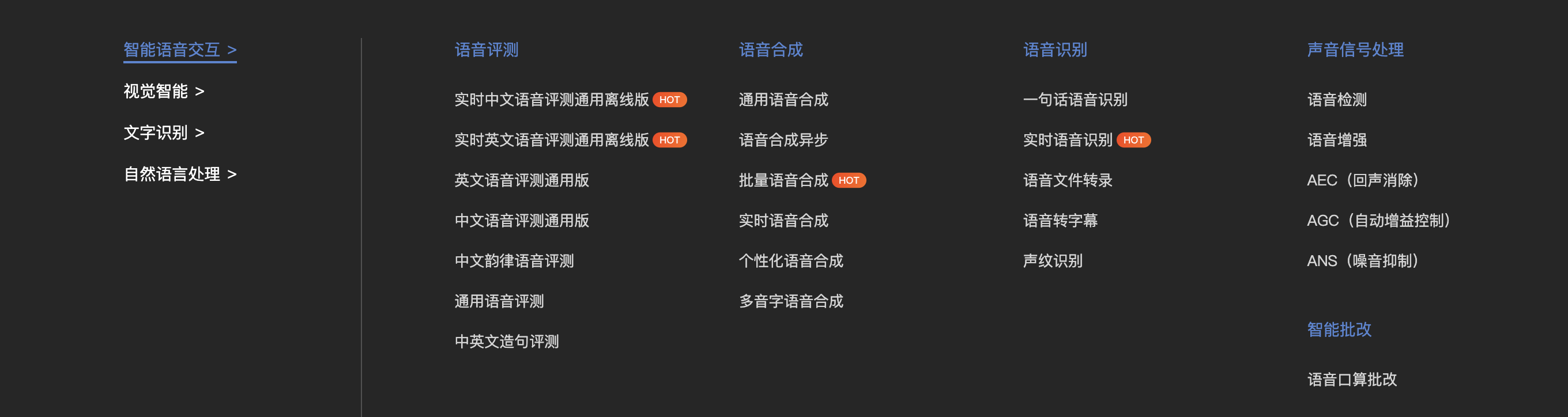
3.改变导航栏样式
之前是纵向加载
现在增加一级标题横向展示
问题/难点:
(1)类组件改 Hooks 性能优化(useCallback)
(2)网页缩小导航栏展示不全
(3)在下拉菜单中滚动时 禁止页面滚动
(4)在 react next 中封装 img 组件引入 svg
(5)瀑布流展示二/三级菜单
实现:
问题(1)
1
| const handleDownloadBtnClick = useCallback(() => {}, [])
|
useCallback 的真正目的还是在于缓存了每次渲染时 inline callback 的实例,这样方便配合上子组件的 shouldComponentUpdate 或者 React.memo 起到减少不必要的渲染的作用。
问题(2)
通过监听滚动,动态设置导航栏盒子的样式
1
2
3
4
5
6
7
| *style*={{ left: isNavLeft }}
const scrollChange = () => {
setIsNavLeft(-document.documentElement.scrollLeft);
};
window.addEventListener('scroll', scrollChange, true);
|
问题(3)
下拉菜单是通过改变 currentActiveMenu 分别展示不同子菜单
当 currentActiveMenu 发生改变时(即:触发下拉框时),将 body 的滚动条禁用,不触发下拉的时候再恢复
通过useEffect,每当 currentActiveMenu 发生改变时就会触发此函数
1
2
3
4
5
6
7
| useEffect(() => {
document.body.style.overflow = 'auto';
// 滚动条滚动时触发
if (currentActiveMenu !== '') {
document.body.style.overflow = 'hidden';
}
}, [currentActiveMenu]);
|
问题(4)
1
2
3
4
5
6
7
8
9
10
11
12
13
14
15
16
17
| // 三级标题的icon组件
const thirdLabelIcon = useCallback((key) => {
return (
<>
{typeof key !== 'undefined' && (
<img
className={less.icon}
src={`../../static/navigator/${TAG_ZH_TO_EN[key]}.svg`}
width="30px"
height="14px"
/>
)}
</>
);
}, []);
// src指向的路径必须放在static目录下 否则加载失败
// TAG_ZH_TO_EN为全局变量,将独家改为dujia
|
问题(5)
瀑布流展示菜单是通过column-count实现https://www.runoob.com/cssref/css3-pr-column-count.html
父盒子将 column-count 设置为 4,即将 div 设置为 4 列
子盒子
1
2
| width: 100%;
break-inside: avoid; // 防止截断二级标题
|